Software AG/IBM
API Control
Plane.
In SoftwareAG, API gateway and Developer portal address traffic management and discovery, but
Teams can't easily see which APIs are healthy, degraded, or failing or understand the state of the
runtimes they depend on. Without this operational view, teams miss performance issues, can't
assess deployment impact, and lack visibility into infrastructure health across environments.
No existing product solves this comprehensively.
ROLE · Senior Product Designer
TIMELINE · Oct 2021 -> Beta May 2023 -> GA Dec 2023
TEAM · PM + Eng Pod
DOMAIN · API Management
0→1
From concept to GA release
1st
Delite 2.0 Product (Software AG Design System)
IBM adopted
IBM bought the product as part of webMethods
00 / 60-
second
summary
Problem, intervention, and outcome at a glance.
Added for reviewers who scan first and dive deep second.
Problem
Teams had data scattered across different tools, but no single, clear source of truth to act on.
Intervention
Built a system organized around relation- ships, where each role sees the right path and can take action right from the context
Outcome
Launched from scratch to give full visibility, faster triage, and better teamwork across roles
01 / Ownership matrix
What I personally owned vs what I partnered on.
Removes ambiguity in contribution depth for lead/staff-level review.
Area
Discovery
IA + flow
Interaction + UI
Content
I owned
Research & Synthesis
Information model
Core Features, prioritization behavior, state handling
Initial Content and Terminology Capture
Partnered with
PM, Design Manager, Engineering Leads
PM, Engineering Lead
Design System Partners, Junior Designer
UX Content Writers
02 /
North Star
The North Star
I created an early North Star from early multi-stakeholder conversations to align the team on a shared direction
"Enable teams to get a unified, real-time view of APIs and Runtimes health across
environments so they can detect issues early, assess impact quickly, and take
confident action."
03 / What is API Control Plane context
I started by understanding the real operating environment.
While the product roadmap called for an API asset management solution, cross-functional teams were misaligned on scope and
direction. Siloed discussions had yielded no concrete conclusions.
Research Methodology
To align stakeholders and establish a shared understanding,
I led my design team through a structured workshop series to
uncover user needs and define deliverables. We designed and
facilitated three workshops: Kickstart (problem alignment), User
Type (persona development), and User Journey (task mapping
and decision-making) to establish a single source of truth for what
we needed to build

This insight became the blueprint for designing solutions that actually solved the problem.
04 / Kickstart workshop findings
What we learned about the problem before solutioning
Multiple question workshop aligned cross-functional teams on problem framing, surfaced key unknowns, and established a research-first direction for API Control Plane strategy. To view the orginal workshop whiteboard Click here
Customers are building fragile workarounds — and paying the cost
Manual tracking in Word/Excel, custom scripts, homegrown softwares which uses our APIs. The overhead is "painstaking, time consuming, and error prone."
Three user roles identified — but persona gaps were explicitly acknowledged
API Infrastructure Owner, API Product Manager and API Governer
Critical assumptions surfaced
Control Plane will simplify management,
Should fit seamlessly into existing products,
Be the cockpit for most API tools,
Have easy adoption, integrate with any vendor,
Support heterogeneous environments, and
Be the "best way" of achieving the goal
Not solving this is existential — customers will leave and analysts will downgrade
Dual-track risk: customer impact (complexity, cost, time waste) and business impact (brand erosion, analyst ranking decline, loss to competitors and cloud vendors). "A well deserved pending item."
Six capability pillars emerged from the problem definition
Discovery
Find APIs across heterogeneous environments and track their lifecycle
Visualization
Landscape view of all Data planes, Runtimes, and APIs
Manage Assets
Deploy assets to multiple runtimes from one place
Monitor Assets
API performance, usage, and operational health across data planes, Runtimes
Governance
Global policy enforcement and compliance across all gateways
Lifecycle
Publish, unpublish, promote, and version APIs across environments
""Let customers have a single place to discover, visualize, manage, and monitor the assets
(APIs) that are deployed across heterogeneous and distributed environments.""
05 / User types & personas
Who the platform must serve.
Persona research identified three user groups with a shared need for a single operational surface, but with different success metrics and task contexts. 3 Personas profiled and ~18 user stories were captured.In this workshop we explored deeper into the users General background, Behavious, Likes, Dislikes To view the orginal workshop whiteboard Click here
Infrastructure Owner
Goal: runtime reliability and platform health.
Pain: fragmented operational tooling.
API Product Manager
Goal: API performance, usage, lifecycle outcomes.
Pain: Inefficiency in monitoring and action flow.
API Governor
Goal: policy consistency and compliance control.
Pain: distributed enforcement and correction.
We focused our initial scope on two core personas: Infrastructure Owners and API Product Managers. API Governance capabilities were intentionally deferred to Phase 2.
06 / User journey mapping
Personas share one platform, but experience very different operational friction.
From the above group 2 personas were prioritized, As part of journey map 8 stages were compare, ~9 top cross-persona issues surfaced. Both users need a single operational surface, yet their success metrics and daily decisions differ. Infrastructure Owner optimizes runtime reliability; API Product Manager optimizes API performance and lifecycle outcomes.
To view orginal whiteboard Click here
Infrastructure Owner (Primary)
Tracks runtime health, SLA, memory, and gateway state across environments.
Faces onboarding forks between SaaS and non-SaaS setups.
Handles incidents across fragmented channels without unified triage.
API Product Manager (Secondary)
Tracks API performance, usage trends, versions, and deployment history.
Needs API-level context, not infra-level telemetry.
Lacks clear governance and lifecycle controls
"Single view" was common language across both personas, but meant different domains:
infrastructure state versus API product performance.
07 /
Context
Understanding the API Landscape
API – API Gateway/Runtime – Data plane
The landscape represents a comprehensive visualization of all available runtimes and associated APIs across the organisation's global operations. Data planes are nothing but a logical grouping of Runtimes

The above shows how APIs(grey), Runtimes(Green) and Data Planes(Purple) are actually connected. its not a linear relationship but multifaceted
08 /
Research findings &
Priorities
From findings to design priorities
Consolidated design directions derived from Kickstart Workshop, User Types, and User Journey research, grouped into clear product-design pillars. I arrived at few design direction pillars. These directions combine strategic framing and implementation guidance, so teams can prioritize what to design now, next, and at scale.
ROLE BASED EXPERIENCE
Design for persona context, not one-size-fits-all views
Everyone works off the same data, but sees it in the way that fits their job — whether they own the infrastructure, manage the APIs, or set the rules.
SURFACE RELATIONSHIP
Make relationship visible
Design experiences that visualize the relationships between APIs, runtimes, and dataplanes, enabling users to quickly trace and identify the source of issues.
ADOPTION AND CHANGE ENABLEMENT
Consistent experience
Help new users learn quickly with step-by-step guidance, and keep the experience consistent so it's easy to stick with over time.
SCALABILITY
The product should be able to handle any scale
Since we're dealing with huge volumes of data across APIs, Runtime and Data planes, scalability has to be a top priority
LOCATION AWARE MONITORING
Improve regional and runtime decision confidence
Let users filter and compare monitoring data by region. so they can spot problems, and how far they might spread, earlier.
OPERATIONAL FLOW AND ACTIONABILITY
Reduce decision latency from signal to intervention
When something goes wrong, show what's connected to it and let people fix it efficiently with context.
Design quality for API Control Plane is defined by how quickly users can move from
uncertainty to coordinated action.
10 /
Next
Steps
The next steps before final design
To kickstart design ideation we had to pull details from our research identified some key starting points
Define data
requirements
Identify which metrics matter most to users
Select visualization
type
Match data types to effective visual forms
Structure information
architecture
Design layout that highlights key insights
Establish reusable interaction
patterns
Create consistent, learnable user flows
11 / Initial Ideation
Structuring UI Around Critical Operations Moments
Add your final feature screenshots below in the order you want reviewers to read them.
"Navigation was the critical focus—we needed to design for the scale and complexity
of the data we were handling"

Engineering team suggested to exclude Applications from initial scope due to technical concerns and decided to introduce once the product matures


Low fidelity Prototype and Discussions with Engg
The low-fidelity screens gave us a concrete way to discuss technical feasibility with engineering early on. One example: the map view was initially flagged due to cost concerns and limited team experience with third-party map providers. My PM and I made the case for tackling it anyway, and the team came on board.
Snippet of low fidelity prototypes for initial level discussions
12 / Product Validation
Validating the Concept
We prototyped early concepts and validated them at IUG (International User Group), our annual customer event. We gathered direct user feedback on the core workflows confirming product-market fit before investing in final design. While some screens were exploratory, the session yielded critical insights that shaped the final direction.

Feedback from IUG 2022
Potential customers responded positively to the initial product.
Customers confirmed viewing the assets in a catalog format was seen as highly valuable and time-saving.
User suggested useful monitoring widgets from their perspective, Which gave us concrete direction on which all widgets to be included in the final product.
13 / Final Screens
The Final Direction
These designs reflect multiple iterations informed by user feedback.
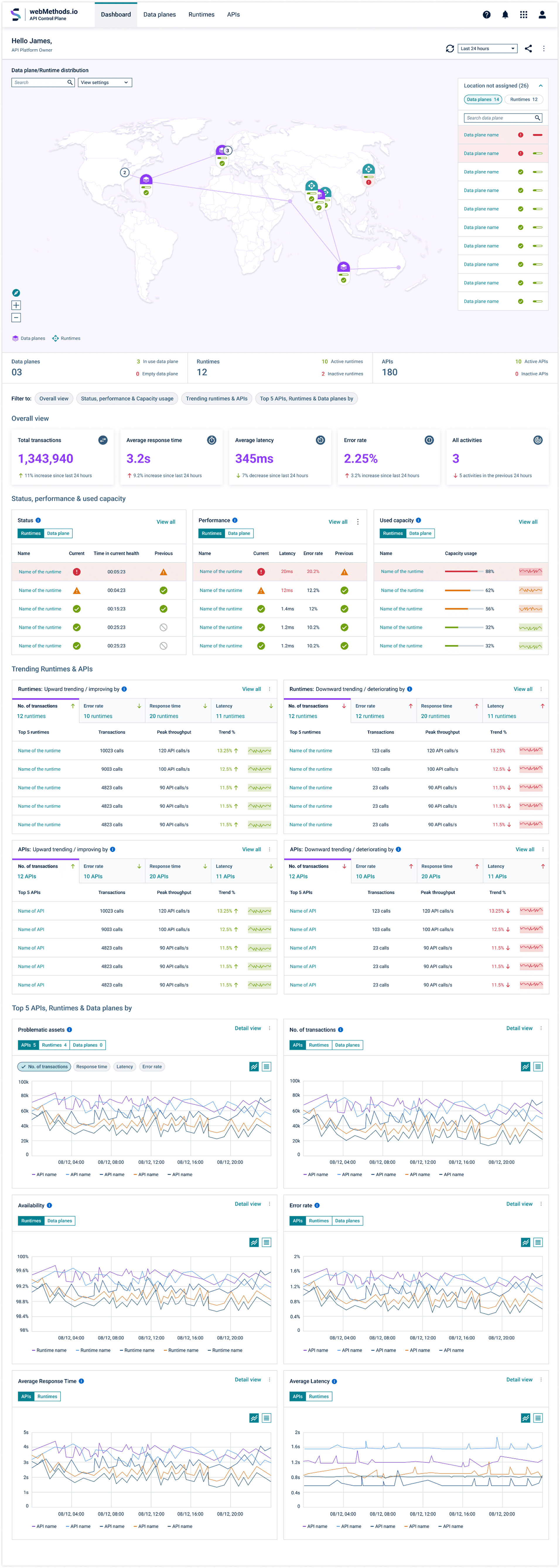
# Visibility of the landscape
Geographic visualization enables users
to understand their infrastructure
distribution at a glance.
# Landscape Overview
Overall overview of
the parameters
# Navigation
Intuitive navigation enables users to quickly locate any asset
# Calender
Time-based filtering enables users to analyze performance trends across any period
# Quick filter
Streamlined filtering for rapid widget selection"
# Widgets
Granular data exploration through purpose-built widgets
# Trending assets
This dashboard is specific for API Platform Owner hence focused on Runtime & APIs
An API Product Manager would a different set of widgets
# Top assets
Analyze transaction volume, availability, error rates, response time, and latency across multiple dimensions
Sankey View
For non-location-based assets, a Sankey view visualizes relationships and dependencies across multiple parameters.

Overall monitoring screens
Dedicated monitoring screens for each asset type provide multiple entry points for insights—users can dive into Data plane runtime or API monitoring based on their workflow.

Parameter based detailed view
Users will be able to go deeper into each widget from the overall monitoring screens

Individual asset analytics
Each asset types would have individual analytics screen. Runtime & APIs will have similar analytics screen. Features for users: Split view, Time series, Quick filters, Overview, Detail views and distribution
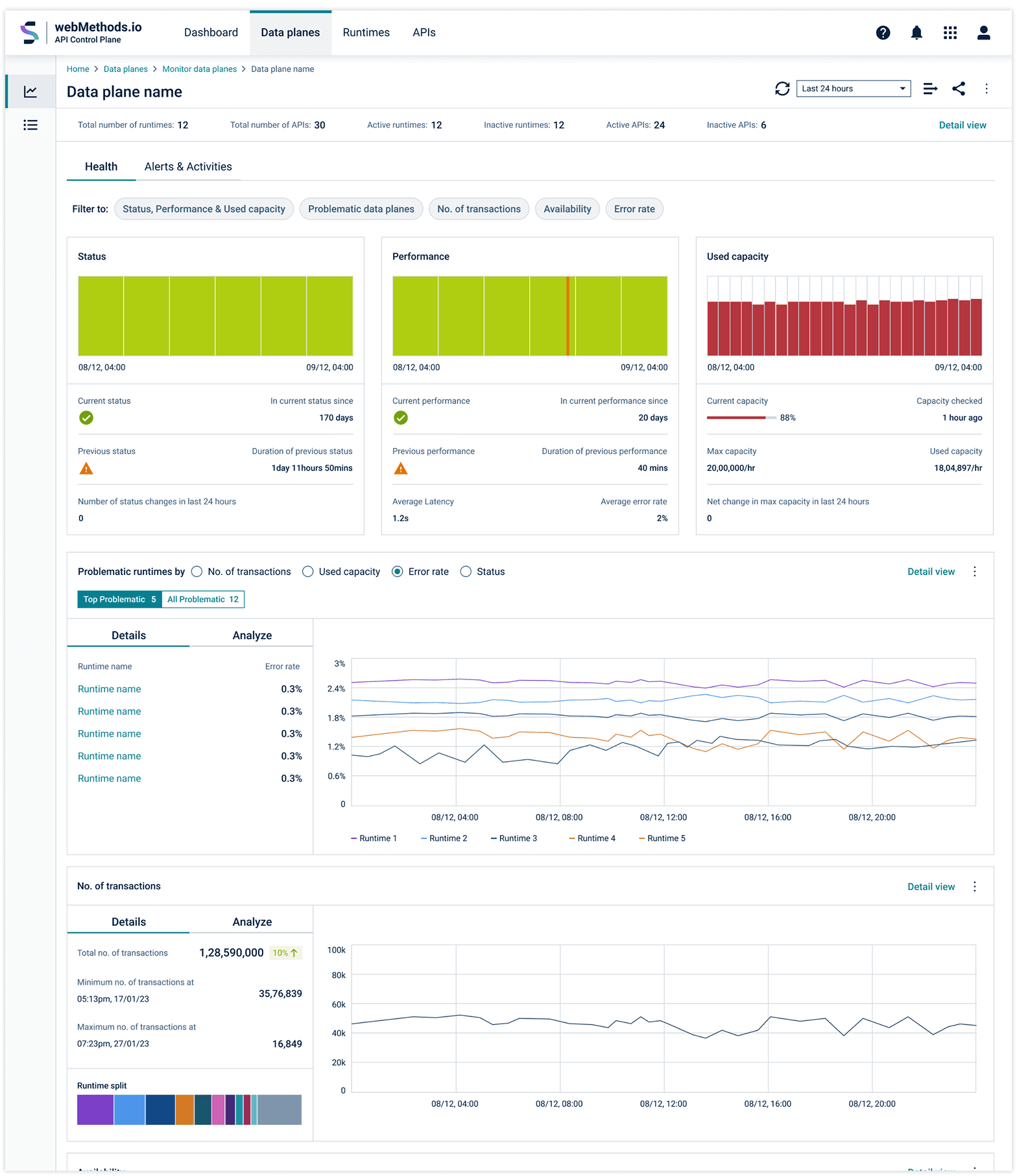
Individual asset deep dive
Users can identify the root cause of anomalies in an asset and drill down further to uncover the underlying issue, with the ability to analyze it at a parameter level.

API Analytics
The API analytics was given a new layout after taking in considerations the issues which surfaced after taking feedback from design experts and customers.

Catalog list view
This catalog view will help users to see all the assets in one place as a list view. Further they have filter and sort options to drill down to the particular assets.

14 / Usability test
Testing & Key Findings
We did online usability tests and in person walkthroughs with customers to uncover problems users have with the product, discover opportunities for improvement, and learn about user behaviour. This was done in between develop stages over a period of time
Findings
Identified confusing terminology
Identified icons that were not intuitive
Identified widgets and visualizatons that were difficult to understand
Outcome
UX Copy review to simplify the content
Extensive tooltip experience
Redesigned widget as per feedback received
15 / What is the impact
How to measure impact
I had proposed the methods with which we can measure the impact of the tool.
MTTD (Mean Time to Detect)
How fast teams detect incidents /anomalies.
Detection-to-Action Time
Time from first alert to first meaningful remediation action.
Context Switching per Incident
Number of tools/screens visited before resolution.
Root-Cause Identification Time
Time to confirm dependency/runtime/API cause
Adoption & Standardization
% business units/teams actively using control plane
Productivity & Cost Efficiency
(Teams + Finance)
Ops hours saved per month
Support escalation volume reduction
I was informed by the engineering team it would take some months for adoption and couple of months more for valuable data patterns to emerge. Unfortunately I left the company before the tool reached good number of users.
16 / Post release development
The product future: Part of IBM Software Labs
IBM Acquired webMethods from SoftwareAG. Control Plane is now called Federated API Management. It now sits inside
IBM webMethods Hybrid Integration (IWHI) which is the IBM webMethods offering under Hybrid Control Plane.
Post Acquisation: Federated API Management
IBM webMethods Hybrid Integration (IWHI) is a unified hybrid integration platform built around a Hybrid Control Plane that gives enterprises centralized governance and visibility across their distributed integration assets. Within that control plane, Federated API Management offers a single way to discover, monitor, govern, and manage APIs across multiple gateways, clouds, and runtime environments — without requiring organizations to standardize on one API platform.
Modern enterprises run APIs across IBM, AWS, Azure, and other gateway technologies, often scattered across business units, clouds, and regions. IWHI's Hybrid Control Plane sits above this fragmented landscape, acting as a single operational layer. Federated API Management is the governance engine within that layer — helping organizations manage API complexity without disrupting the investments they've already made.

I wasn't part of the original design decisions — I'm simply surfacing what happened with the product. Especially in the enterprise world, outcomes like this can unfold in many different ways, so this is just one read on how things played out
17 / What this project has taught me
I learned design brings clarity to complexity
This project reinforced the habits I now carry into every large-scale operations redesign.
Design lessons I carry forward
Although each stakeholder had deep domain knowledge, there was no shared starting point. The workshops I facilitated helped capture the core problem and align everyone on the same page. This is a key lesson I carry forward: design methods create clarity and momentum, not just solutions.
What I would do differently next time
I learned that strong design documentation is essential in long-duration projects. It preserves intent as teams and priorities evolve, keeps stakeholders aligned, and reduces rework by making decisions and trade-offs explicit. In complex platform work, documentation is a continuity tool, not just a handoff artifact.
18 / How I would redesign with AI in 2026
I would keep the workflow, and add AI at the friction points that caused the most delay.
I revisited this project to explore where AI could add value without redesigning the core workflow. Because the product already had stable usage patterns and rich operational data, it was a strong candidate for targeted AI enhancements.
Intelligent Incident Triage
AI can correlate signals across APIs, runtimes, and data planes to identify probable root cause faster.
Instead of operators manually jumping across dashboards, AI can provide a ranked “likely causes” list and recommended first action.
Impact: lower MTTD/MTTR and less context switching during incidents.
Predictive Risk & Capacity Insights
AI can detect early patterns in latency, error rate, traffic spikes, and dependency stress before they become incidents.
It can forecast risk windows (e.g., “runtime cluster likely to breach SLA in next 2 hours”) and suggest preventive actions.
Impact: fewer outages, better reliability planning, proactive operations.
Policy & Governance Copilot
AI can analyze API behavior and suggest policy updates (rate limits, auth guardrails, compliance checks) based on observed patterns.
It can also explain policy impact before applying changes and flag risky misconfigurations.
Impact: stronger governance, safer changes, faster compliance decision-making.
Beyond outcomes, this project sharpened how I approach enterprise workflow design under operational pressure.