BlackBuck -Zinka Logistics· Design case study
BlacBuck
Pro App.
This operations app was built for the field team (CPTs) ~ 1200 in numbers, who manage truck fulfilment after an order is placed. Before that, CPTs, Field Officers working on the ground source trucks from supply partners (brokers and fleet owners), who bid for orders through a separate app. CPTs select partners based on price and past performance.
Since CPTs work primarily in the field, giving them a dedicated mobile experience was key to improving their productivity — replacing their previous reliance on a web portal not designed for on-the-ground use.
ROLE · Product Designer
SCOPE · End-to-end product concept
OUTPUT · Hi-fi prototype + rationale
00 / 60-second summary
What problem I solved and how.
Design a mobile application for our field team inorder to reduce the effort they take to interact with truck owners and help them do more business by taking faster decisions and reduce dependency on BlackBuck web portals
Problem
Users could see status, but could not quickly identify owner, urgency, and next action
Intervention
Created a mobile-first flow with explicit ownership, blocker handling, and in-context updates
Outcome
Product released to Field Team. With 100% Adoption
01 / Ownership matrix
What I personally owned vs what I partnered on.
Removes ambiguity in contribution depth for lead/staff-level review.
Problem
Discovery
IA + flow
Interaction + UI
Content
I owned
Research framing, synthesis
Information model and navigation hierarchy
Core Features, prioritization behavior, state handling
Initial Content and Terminology Capture
Partnered with
Product Head, Product Manager
Fellow Product Designer
Visual Designers
Content Designers
02 /
Project requirement
Why this experience needed a faster decision flow.
Operational coordination often happens under time pressure. The experience must support quick decisions with clear ownership.
Users and moments
Coordinators checking blockers while moving between meetings.
Stakeholders requesting confidence updates on current progress.
Owners needing clear escalation and follow-through visibility.
Project constraints
No production telemetry available at concept stage.
Design had to prioritize clarity over feature breadth.
Output needed to be stakeholder-review ready.
From here, I focused research on where action ambiguity appeared most often.
03 / User types
I mapped primary and secondary users before defining screens.
Understanding the users is the most important step in designing any product. If this is not done the whole project can go for a toss. In this project the users are company field employee's and managers. Even then as a designers I was not familiar with the process they follow or the problems they face in the field
Procurement Officers (CPT)
Sources trucks from supply partners (brokers/fleet owners) before the OE's fulfilment process begins
Evaluates and accepts bids based on price and the partner's past performance
Works on the ground, but currently relies on a web portal not built for field use
BlackBuck Brokers (OE)
Handles the complete fulfilment process after a truck has been assigned to an order
Traditionally the team responsible for execution once sourcing is done
Team Heads (ABM/ABL)
Manages and guides a team of OEs and CPTs across multiple locations, ensuring smooth and effective conversion outcomes.
We focused only on CPT and OEs, of which I was assigned the task for designing for the CPTs. Another fellow designer was assigned the task for OEs App design.
But it was decided it will be one app for both kind of users. it depends on their user credentials the App with have different experience.
04 / User journey mapping
I mapped end-to-end flow to identify confidence drop-offs.
Journey mapping of OEs and CPTs helped prioritize moments where ownership and next-step clarity were weakest.
User Journey Stages
Load Requirement Capturing
Load Assigned to CPTs
Finding Supply Partner
Verifying the documents and details
Assigning tasks to OEs
OEs complete all tasks
Calling out delays and issues
Confirming load is delivered successfully
Confirm payment to supply partners
Details
Companies and SME's post their requirements in the online portal provided by BlackBuck
The loads are assigned to particular procurements officers in that area
They have to find supply partners (brokers & truckowners) for taking the load
They have to verify the documents of truck and supply partners
Each supply partners details will be captured by the OE's in the field and the load is given to the SP's
From loading to unloading the OE's will be assigned tasks to ensure smooth transfer of goods
CPT's identify and resolve issues that arise during the process as quickly as possible
CPT's have to ensure the load has reached without any damage and delay.
CPT's will have to ensure all payments and documents are send and received within estimated time.
05 / Current Task Flow
I started by understanding how the current workflow actually operates on the ground.
This happened after discussing with CPTs and OEs in the ground

Communication and Visibility Issues
Root cause synthesis:
The core issue is that the entire operational workflow (assignment → execution → tracking → editing → payment confirmation) runs on manual, disconnected channels (calls, emails, and a non-responsive portal) with no shared source of truth — resulting in poor visibility, accountability gaps, and heavy dependency on the central team for even small changes. This directly justifies the decision to build a dedicated native mobile app for CPTs and OEs. And one of the main issue is they need to operate this tools in the field were trucks are parked with less connectivity.
06 / Problem breakdown
I framed the friction in five layers.
This helped convert broad pain points into design decisions. The problems areas were discussed after discsussing with CPTs and OEs in the field. Couple of patterns emerged from this conversations. Also the exsisting portal was analysed.
Lack of visibility & accountability
No proof of whether a task has been assigned to a specific OE, or confirmation once it's done
No real-time visibility into task status
No way to track OE's daily work completion
Team leads have no visibility into the stages of a task
Team handling and permissions for certain tasks aren't captured in the system
Manual, unverifiable communication
CPTs manage OEs manually — there's no system of record for assignment or progress
Communication between CPT and central team happens over phone calls, so nothing is documented
Communication between CPT and OE is also entirely manual (phone-based)
OEs upload details only at the end of the day, so there's no real-time sync between CPT and OE
Web portal limitations
The portal isn't responsive, making it hard to use on the field
It's part of a larger application, so changes/modifications are slow and difficult
No accessibility for OEs at all — the portal is CPT-only
Editing load/indent details is nearly impossible through the portal, and requires central team involvement
Editing typically requires sending multiple emails to the central team, with delayed responses
Data & history gaps
No way to access past indent details to check payment status
No way to measure or understand field employee efficiency
Central team as a bottleneck
Only one-way communication with the central team (call-only)
Central team must be looped in for portal edits, creating delays
Resolving problems with the central team is consistently difficult
07 /
Context, Ideation
Some principles to guide the product ideation.
These principles kept the concept focused and implementation-friendly.
Action proximity
Place primary action where risk is discovered.
Ownership clarity
Always pair status with owner and due date.
Progressive disclosure
List -> detail -> remediation
without overload
State consistency
Repeatable state system: in progress, at risk, blocked, completed.
Mobile-first hierarchy
Optimize scanability and one-thumb decision flow.
08 /
Main task flows
I structured the experience around four core flows.
Each flow maps to a high-frequency decision moment in operational coordination.
Flow set
Intake and request creation
Planning and assignment
Tracking and blocker handling
Stakeholder communication
Before vs After
Before: scattered status, unclear ownership, manual updates.
After: one mobile workflow with explicit owner, due date, blocker path, and structured updates.
10 /
Next
Steps
Final Designs
To kickstart design ideation we had to pull details from our research identified some key starting points

Home Screen
Can view allotted work in single screen.
The work is chronologically arranged.
New indents are called out to catch attention.
Will have an over view of response of supply partners for each load and users can take appropriate effort.
Search option available for quick access.
Access to orders, Will be able to see status of OE's
Indent Detail Screen
Indepth view of indent details
Direct link to converted orders
Will be able to convert orders without calling, Accept & Bid, reduces effort and on call time.
Details of supply partner available.
Edit, cancel & raising ticket for indent can be easily done through app


Order Section
The base design has been done by the other designer for order section since he was responsible for it.
Overall view of the OE's work.
Errors will be called out.
Status of each order can be viewed
Notifies when new orders come.
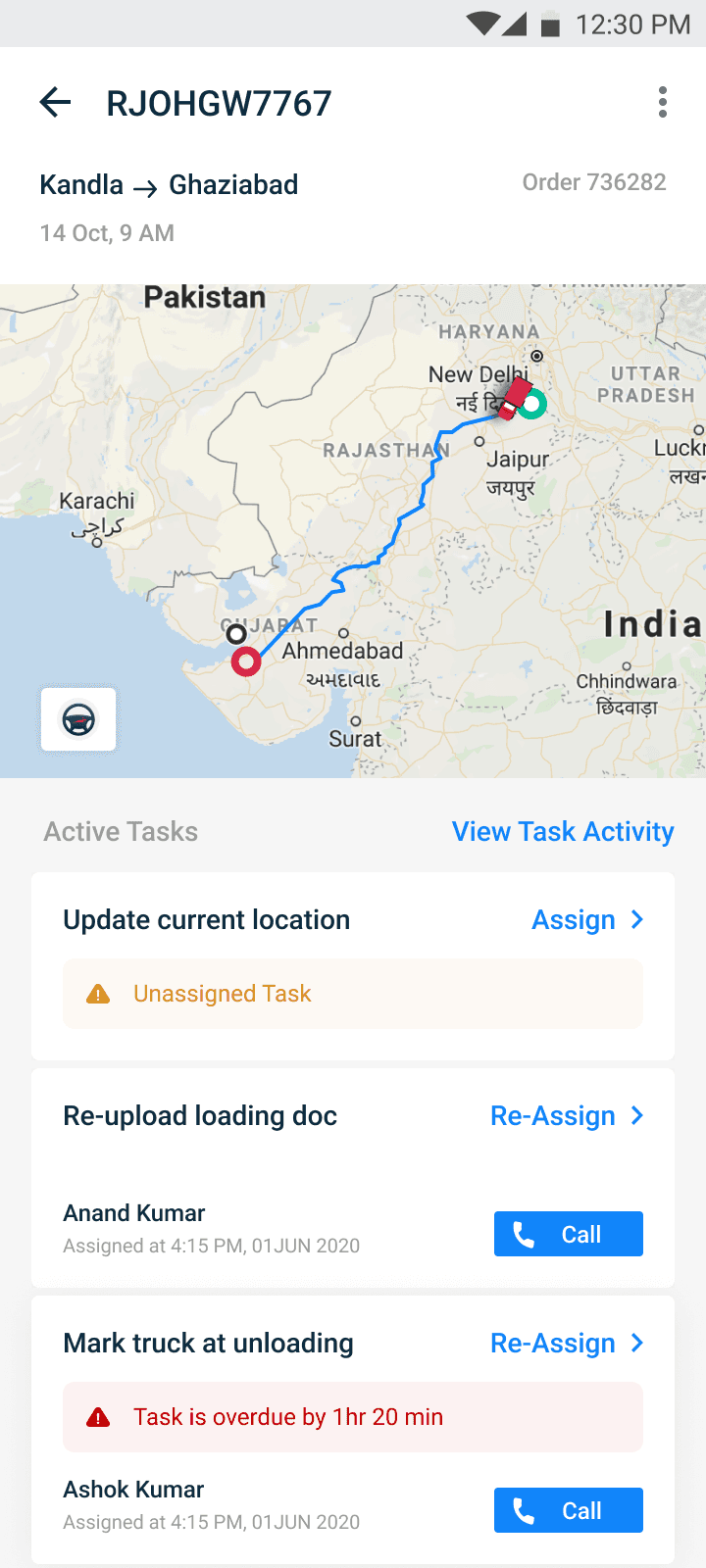
Order Detail Screen
Active tasks will be called out.
Unassigned task will be called out.
CPT's can assign task to OE's through the app.
Order stage can be seen and necessary action can be taken

Team Section
The team can be handled by the CPT through the application
The work status of their particular team member can be seen.
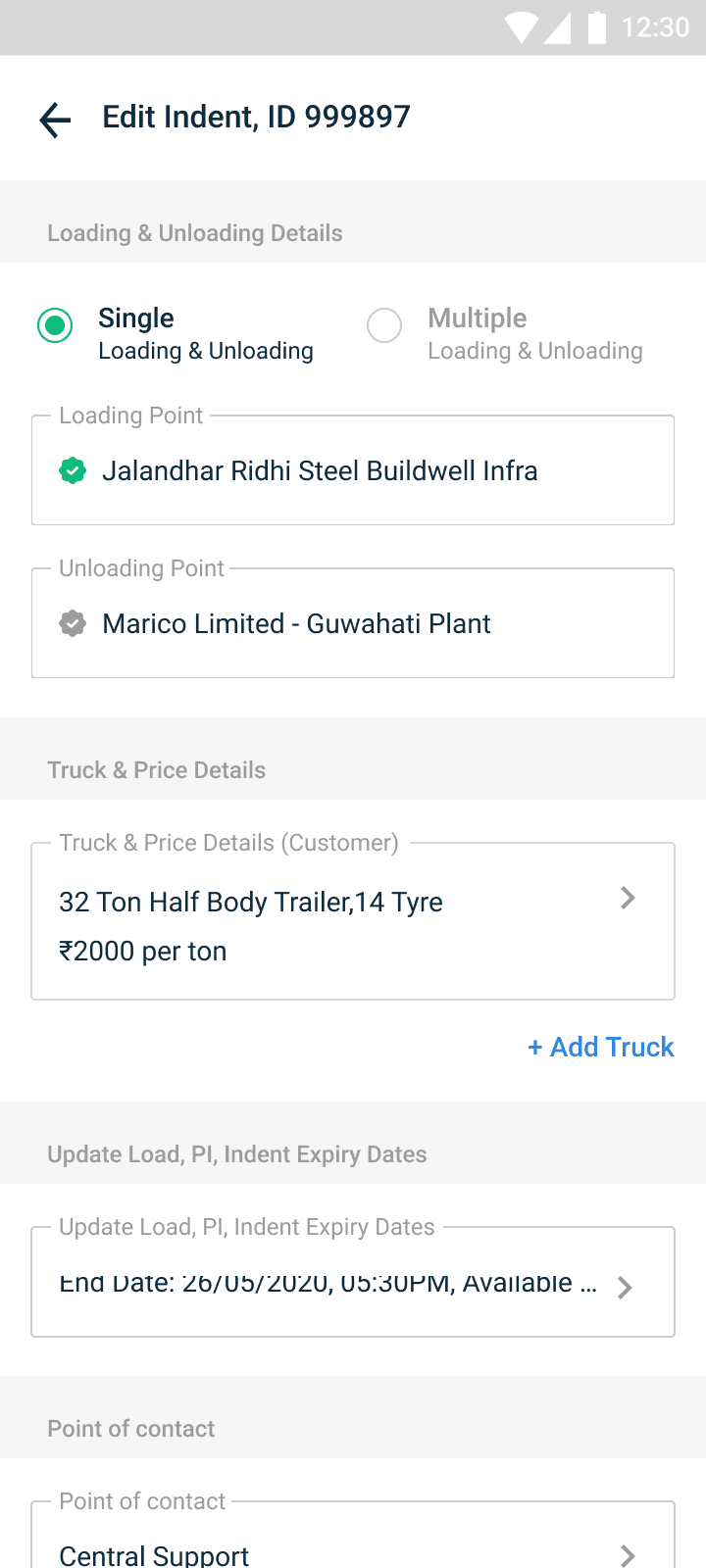
Editing Indent
Can edit indent through app itself
Permissions will be automatically send to the concerned team.
CPT will be notified when permissions are accepted & rejected
11 / Initial Ideation
Insights from Usability Testing
Clickable prototypes were given send to CPTs and their phones screen share was done how they interact with the product.
Insight 1
Filter has to be added with location filter option
Insight 2
Terminologies have to revisited
Insight 3
Edit option was not accessible
Insight 4
Users were able to easily navigate through app after one or two times of usage, Since they are familiar with the process.
Insight 5
But still I felt training is required for a newly onboarder user since it contains flows which are unique to BlackBuck mode of operation. So videos were prepared for this reason."
10 / Impact and next step
The project output
BlackBuck PRO App was released to CPTs and OEs
Following release, we conducted onboarding training sessions across the field teams. The feedback was overwhelmingly positive — the app significantly streamlined their workflow and eliminated several manual, time-consuming tasks."